

Advanced Settings for OpenIPC
🛜 Jumbo Frame 50 Mbit
Jumbo frame is an Ethernet packet whose size exceeds the standard 1500 bytes (MTU). These packets are typically up to 9000 bytes.
This feature allows more data to be transferred at once, reducing the number of individual packets and improving network performance.
Why Use It?
| Benefit | Explanation |
|---|---|
| ✅ Lower CPU load | Fewer packets = less processing |
| ✅ Higher data throughput | Ideal for high-bandwidth streams: video, FPV. |
| ✅ Lower latency | More stable link, less processing time per packet |
Note!
Jumbo frame only works if all devices on the network support large packets (camera and VRX with firmware 1.9.9+)
Jumbo Frame Setup Guide
1. Download OpenIPC Configurator Mario
Download the unofficial OpenIPC Configurator
This tool allows flexible configuration of network parameters, image settings and firmware updates.
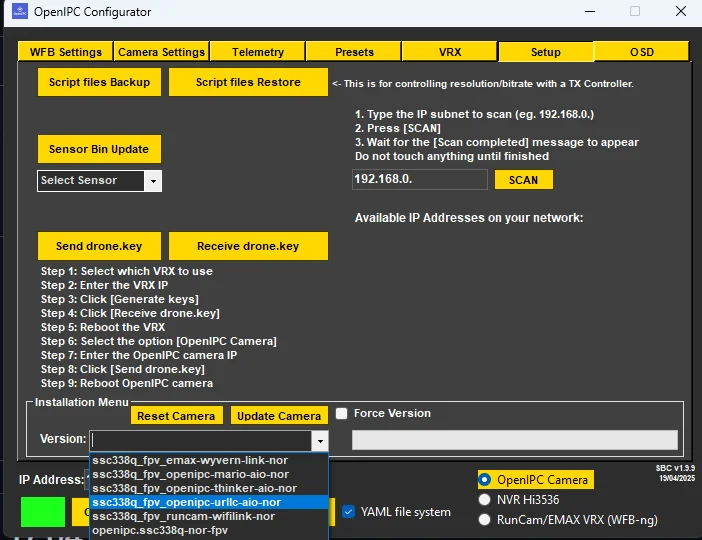
2. Update the Firmware
Update the camera firmware to: openipc-urlic-aio-nor
3. Change MTU to 3994
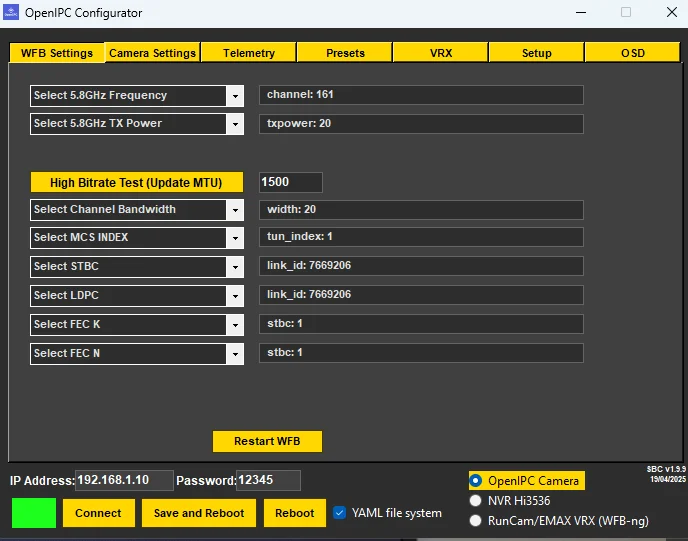
Go to the WFB Settings tab and find the MTU parameter.
- ▶️ Default value:
1500 - ▶️ Change to:
3994 - ✅ Click Save and Reboot to restart the device.
4. Sensor Bin File for Improved Image Quality
Use the sensor bin file from Greg to improve image sharpness.
- Go to
Setup → Bin File Update - Download the recommended file.

💡 Note
MTU value 3994 provides larger packet sizes, which reduces latency and improves video stream quality over Ethernet.
Air Unit Overheating Protection
- Open
/usr/bin/on the Air Unit and upload the script.
💡 Note
This script automatically checks the VTX and Wi-Fi adapter temperature and restarts the device in case of overheating.
temperatura_check.sh — temperatura_check.sh
- Then open
/etc/rc.local/and addtemperatura_check &